Lab Communication & Admin
Communication in Slack
Our primary format for lab communication is Slack. Emails are only used for more formal communication, such as booking a committee meeting, or communicating with folks outside of Team Shrub (e.g., admin, etc.). You should read and acknowledge receipt of all important Slack messages, and respond to requests for information within one or two days unless you are away on holiday
Note that you should reply to Slack messages under the ‘thread’, rather than sending additional stand-alone messages– to best keep all ideas together and allow other folks to respond.
Here is the link to join the Team Shrub Slack
Our slack URL is teamshrub.slack.com
If you are unfamiliar with Slack, you can read their quickstart guide here.
There are a number of important channels that you should be included in on Slack, and others that are optional but helpful. Some required channels include:
# general : includes all members of Team Shrub, including guests, those in Edinburgh and elsewhere. Should be used for broad announcements, advice, celebrations and kudos, conferences, and more.
# team-shrub-ubc : Only includes Team Shrub members at UBC and should be used for general inquiries relevant to those on campus
# lab-meetings : Used for planning and reminding folks about UBC Team Shrub lab meetings
# random : Includes all Team Shrub members at UBC and beyond, and should be used for social, non-work communication and fun things. :)
Please ask your fellow students about other relevant channels, which might include channels for particular research topics, PhD student communication, specific directed studies classes, and etc.
Team Shrub Google Drive
Google Drive includes many great resources, including tutorialsfrom past lab meetings, example posters, past field work planning and more! Take the time to explore the files so you know what resources you have.
To get access, you can log in to the Team Shrub google account, and add it as a second account on your laptop. The first time you do this, you will need to coordinate with Pauline or Isla as the account will send a verification code to ensure a new device is allowed to log in.
The email address is teamshrub@gmail.com. To obtain the password, please contact Pauline or Isla.
Reporting expenses
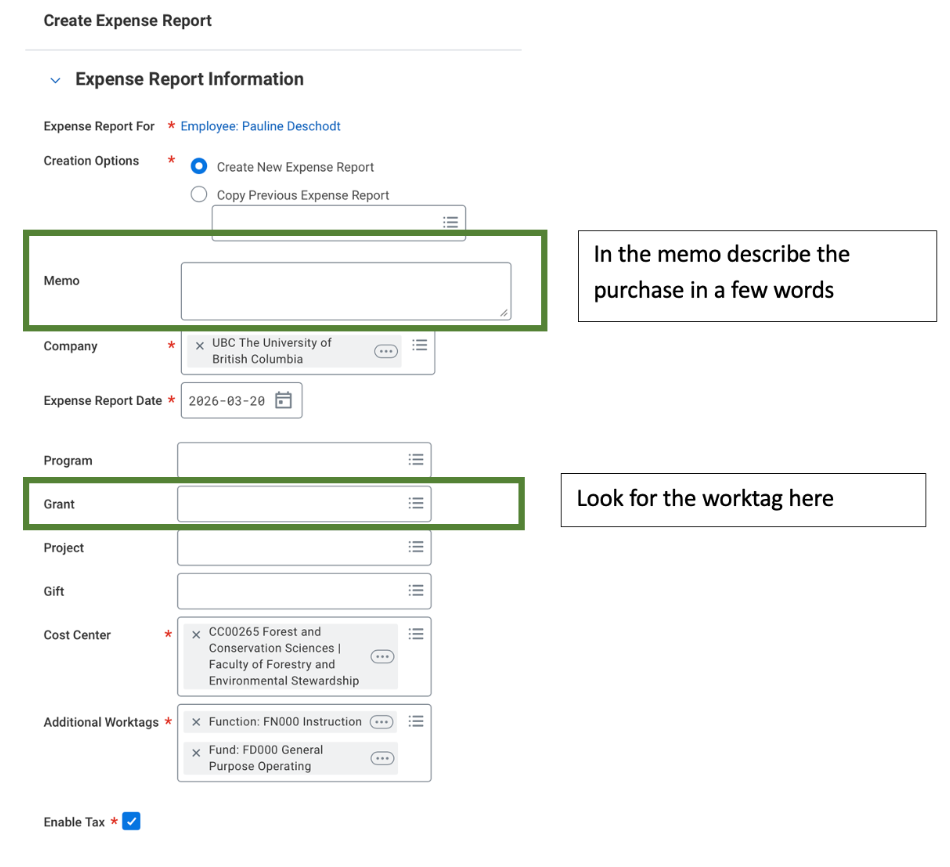
You are not expected to pay out of pocket for (most) travel and equipment to do your research. Reimbursements can be submitted through Workday using the following worktags related to your project.
Team Shrub worktag
- CERC Students: PYMR GR029415
- ERC Resilience: PUFB GR026676
- Growth Chamber, Root Experiment, TundraTime Project: PZYC GR030523
- Training (First Aid, PAL, etc.): PYGN GR029419
Purchasing:
Pauline, Claudia, and Isla can also make purchases on behalf of anyone in the team. You do not need to pay out-of-pocket or manage Workday transactions for regular project expenses.
If you pay for yourself:
- All reimbursements are processed through UBC Workday:
- Create an Expense Report
Note:
- Gas/ Mileage: UBC reimburse one or the other not both
- Meals: only food items and non alcoholic drinks are eligible to be expenses
- Receipts: Keep all your receipts, Team Shrub can be audited and required to provide documentation for all purchases